Posts

Excel Drop Down List
Image
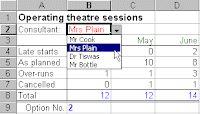
Excel is excellent and lets see how it helps you using this drop down list features ! If you don't want to risk an item being miss-typed in a cell, drop down lists are an ideal solution. So These lists display all of the available choices to the user so that they can click on their preference. Excel allows you to place two different types of drop down list on your worksheet - either a validation list or a form object. A validation drop down list These lists are contained within a cell on your worksheet and the drop down arrow (to the right of the cell) does not appear unless the cell is selected. To add a list to a worksheet place the cursor in the required cell and then selectData Validation Settings. In the dialog box select 'Allow: List' and ensure the 'In-cell dropdown' box is ticked. The source data refers to a range of cells containing the selection of options. If you use the mouse to point to a range of cells (e.g. H12:H15), they must normally be contained o...

Get Up To Speed With Microsoft Word 2007

Released in January 2007, Microsoft Word 2007 has undergone some drastic changes, most noticeable of which is the replacement of the old menu and toolbar system with the new ribbon. The ribbon is the focal point of a new user interface designed to make it even quicker and easier to perform professional document authoring tasks. Once you are familiar with using the ribbon in Word 2007, you will find the transition to all the other products in Office 2007 a doddle - the ribbon is common to them all. And so are new concepts like themes and content controls. Whether you create newsletters, articles, annual reports or update a blog, Microsoft Word 2007 enables you to create, edit and share content in a variety of formats. Themes allow you to change the entire look of a document with just a few mouse clicks. Building blocks give you the opportunity to create reusable content, helping you to cut down time spent on the creation and cross referencing of key information like document title, subt...

Microsoft InfoPath

Image
Microsoft InfoPath (full name Microsoft Office InfoPath) is an application used to develop XML-based data entry forms, first released as part of the Microsoft Office 2003 suite of programs in late 2003 and later released as part of Microsoft Office 2007. Initially given the codename XDocs, the main feature of InfoPath is its ability to author and view XML documents with support for custom-defined XML schemata. It can connect to external systems using XML Web services through MSXML and the SOAP Toolkit, and back-end and middle-tier systems can be configured to communicate by using Web services standards such as SOAP, UDDI, and WSDL. Additionally, because InfoPath documents are raw XML, it is possible to directly repurpose the data in other XML processors. In InfoPath, the user can complete a form while off-line. InfoPath may check some fields on the form for validity, and the user can attach a digital signature. The user later connects to the server and submits the form (in XML form), w...

Market Share Ms Office Publisher

Publisher has a relatively small share of the desktop publishing market, which is dominated by Adobe InDesign and QuarkXPress.[2] Publisher has historically been less well-liked among high-end commercial print shops, compared with other desktop publishing applications.[3] Publisher's position as an entry-level application aggravates many issues (particularly in older versions) such as fonts unavailable and embedded objects not available on service providers' machines (however, Publisher does come with tools to pack related files into a self-expanding application). Many higher end features like transparency, object shadowing, slugs, text on paths, built-in PDF output, etc. are either not fully-functional or simply unavailable (especially in previous versions). However, recent versions have greater capabilities concerning color separations and proper process coloring output. Publisher 2007 also includes the capability to output commercial press quality PDF with embedded fonts as ...

Ms office Publisher 2003

Microsoft Publisher, officially Microsoft Office Publisher, is a desktop publishing application from Microsoft. It is an entry-level application, differing from Microsoft Word in that the emphasis is placed on page layout and design rather than text composition and proofing.Ms Office Publisher 2003 is blended with many features that can help you in works related to publications including web publishing. Read more.... by David Bartosik, MVP As a Microsoft Publisher MVP and Office 11 beta tester, I've had ample time to get to know all the changes that have been made to the products web design functionality in this latest release. In this article I'll share some of these with you along with some input on my experience. Personally my favorite thing about this version is that the products Personal Info Dialog Box finally has an option to turn it off. Through each version I have never used the Personal Info feature and that pop up dialog on each new publication has always annoyed me....

What makes your office work fast!!

If you really want to work faster in ms offfice applications. At the time of installation you should keep in mind that, install minimal application then as and when needed get it upgraded that really works faster. Check by reinstalling ms office application on your machine.

Ms Office Tools MS Access Snapshot viewer

Image
Discover the new things in ms office tools if you are new ... Today I am going to put forth the information about snapshot viewer. You may have come across this before or may have never. So lets check what's ultimate microsoft people has done for the ms office users around the world. First lets learn about snapshot viewer Snapshot Viewer is a program that you can use to view, print, and mail a snapshot, such as a report snapshot. Snapshot Viewer version 9.0 consists of a stand-alone executable program, a Snapshot Viewer control (Snapview.ocx), a help file, and other related files. By default, Snapshot Viewer is automatically installed by Microsoft Access 2000 the first time you create a report snapshot. You can also install Snapshot Viewer from the Setup program, or from a World Wide Web software download page located at the Microsoft Access Developer's Web site. You can use the Snapshot Viewer control to view a snapshot from Microsoft Internet Explorer version 3.0 or later or...