Posts

Showing posts from November, 2008

“In the cloud” ~ Using Microsoft Access to query and update Web sites
Image
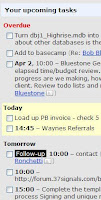
By Garry Robinson Hello Microsoft Access developers and power users, Garry Robinson and in his first article for Database Journal. In case you haven't read his articles before, he used to write for a magazine called Smart Access with Danny Lesandrini, your Database Journal writer since 2004. He has also written Microsoft Access articles for MSDN and He wrote a book on protecting your Access database in 2003. Anyway the main thing you can be assured about is that He is passionate about Access and he hopes he can introduce you to some successful software over the next few months. In this article, He is going to describe how you can use an Access Database and VBA to manipulate a Web 2 application called Highrise, a customer relationship management (CRM) tool from the highly successful Web2 company, 37Signals. Why pick this online product? The main reason is that I love using it, it has a well-written Application Programming Interface (API) and it is free for your first two hundred con...

The new thing in the old

Ms word 2007 Microsoft Office Word 2007 helps you produce professional-looking documents by providing a comprehensive set of tools for creating and formatting your document in the new Microsoft Office Fluent user interface. Rich review, commenting, and comparison capabilities help you quickly gather and manage feedback from colleagues. Advanced data integration ensures that documents stay connected to important sources of business information.

When should you use the Vlookup function?

When you have a table with data, and you wish to retrieve specific information from it. For example:You have an Excel table with student names and their grades.You wish that you could somewhere in the sheet type a student name, and immediately retrieve his grade (based on the data in the table).To achieve this, you can use "Vlookup": the function will look for the student’s name in the first column in the table, and will retrieve the information that is next to his name in the second column (which is his grade). Another example:You have a big table consisting thousands of bank accounts.You wish to retrieve in another worksheet information regarding some specific accounts.To achieve this, you can type these specific account numbers, and put a Vlookup function next each one of them. The function will look for the account numbers in the big table, and retrieve relevant information from it. The difference between “Exact match” and “Closest match”: When you use the Vlookup functio...

Microsoft Outlook

Image
About Microsoft Outlook 2002 Microsoft outlook 2002 is the upgrade to Microsoft Outlook 2000 and includes the below new features. Outlook Hotmail support Autocomplete addressing Intuitive management of e-mail, contacts, and appointments Smart tags in Wordmail Overall, users who are utilizing Microsoft Outlook 2000 would most likely not find it necessary to upgrade to Microsoft Outlook 2002 unless they believe the above features will be useful. About Outlook 2000 Microsoft Outlook 2000 is an advanced e-mail software program that allows users to send and receive e-mail. In addition to e-mail, Outlook has a personal calendar and group scheduling, personal contacts, personal tasks and the ability to collaborate and schedule with other users. About Outlook Express Outlook express is a slimmed down version of the Microsoft Outlook software family. Outlook express is included with Microsoft Internet Explorer and also with Microsoft Windows 98 and above.

Introduction to Data Fields

A database from scratch create a database using one of the available templates. This approach provides you with readily made objects you can directly start using. Another technique consists of creating an empty database that has no built-in object. Starting a database from scratch allows you to create and add its different objects when necessary. The main advantage of this approach is that you will exercise as much control as possible on your database because you will be creating all of your objects. The disadvantage is that you will miss that primary layout that the templates offer. Creating a database from scratch simply means starting from a blank database and adding the different components. Of course, after learning how to perform some changes, you will be able to modify some aspects of a database, whether created from a template or started from scratch. To create a database from scratch, if you are just launching Microsoft Access, in the left section, you can click Featuring. Th...

Introduction to Ms Access

Microsoft Access is a computer application used to create and manage computer-based databases on desktop computers and/or on connected computers (a network). Microsoft Access can be used for personal information management (PIM), in a small business to organize and manage data, or in an enterprise to communicate with servers. Like any other computer application, in order to use Microsoft Access, you must first install it. After installing Microsoft Access, then you can open it. There are various ways you can open Microsoft Access. It gets launched like the usual products you have probably been using. As such, to start this program, you could click Start -> (All) Programs -> Microsoft Office -> Microsoft Office Access 2007. You can also launch it from Windows Explorer or My Computer. To do this, locate its shortcut in Windows Explorer or My Computer. By default, Microsoft Access 2007 is located in C:\Program Files\Microsoft Office\Office12 and its shortcut is called MSACCESS.EX...