Posts

Showing posts from August 7, 2008

Customize your work week
Image
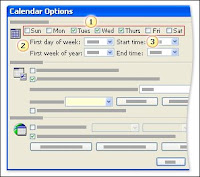
Does your work week start on Tuesday and end on Thursday? Lucky you! You'll be pleased to know that Outlook can display the work week for you that way. You would do this by modifying the settings in the Calendar Options dialog box, as we've shown in the picture. (To open this dialog box, you would click Options on the Tools menu, and then click Calendar Options). After you modify the settings for the work week, you'll see the Work Week view when you click the Work Week button on the Standard toolbar (note that even if you change the work week to contain some number of days other than 5, the button will continue to display the number 5). In this view, Outlook shows only the days of your work week, and it displays the working hours in a slightly lighter color than the rest of the calendar background. You'll get a chance to try this on your own in the practice session that is coming up next. If you're using Microsoft Exchange Server, one benefit of setting up your work...
6 tips for adding international characters and symbols to your document

Image
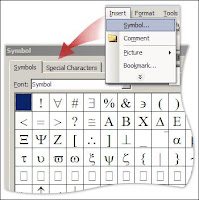
from microsoft.com Applies to Microsoft Office Word 2003Microsoft Word 2000 and 2002 Addressing a letter to a customer with an umlaut in the name? Comparing U.S. dollars to yen, euros, and pounds sterling in a report? Need to include characters from the Greek alphabet in your science homework? It's amazing how often you need a symbol or international character when you're creating a document. If you are having trouble finding the symbol or character you are looking for, tip 1 shows you how to locate characters in the Symbol dialog box, and tip 2 provides additional information about inserting international characters. If you have already found the symbol or character you want, these four tricks make adding the symbols or characters you use often even faster. Tip 3 and tip 4 show you how to customize Word to open the Symbol dialog box with one click or keyboard shortcut. Tip 5 and tip 6 show you how to set up shortcuts for inserting characters or symbols that you use all t...