Posts

Showing posts from September, 2009

Microsoft Office 2007

Image
Microsoft Office 2007 (officially called 2007 Microsoft Office System) is the most recent Windows version of the Microsoft Office System, Microsoft's productivity suite. Formerly known as Office 12 in the initial stages of its beta cycle, it was released to volume license customers on November 30, 2006[1] and made available to retail customers on January 30, 2007. These are, respectively, the same dates Windows Vista was released to volume licensing and retail customers. Office 2007 contains a number of new features, the most notable of which is the entirely new graphical user interface called the Fluent User Interface[2] (initially referred to as the Ribbon User Interface), replacing the menus and toolbars – which have been the cornerstone of Office since its inception – with a tabbed toolbar, known as the Ribbon. Office 2007 requires Windows XP with Service Pack 2 or higher, Windows Server 2003 with Service Pack 1 or higher, or Windows Vista.[3] The 'Ribbon User Interface...
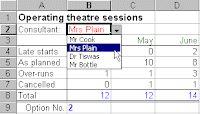
Excel Drop Down List

Image
Excel is excellent and lets see how it helps you using this drop down list features ! If you don't want to risk an item being miss-typed in a cell, drop down lists are an ideal solution. So These lists display all of the available choices to the user so that they can click on their preference. Excel allows you to place two different types of drop down list on your worksheet - either a validation list or a form object. A validation drop down list These lists are contained within a cell on your worksheet and the drop down arrow (to the right of the cell) does not appear unless the cell is selected. To add a list to a worksheet place the cursor in the required cell and then selectData Validation Settings. In the dialog box select 'Allow: List' and ensure the 'In-cell dropdown' box is ticked. The source data refers to a range of cells containing the selection of options. If you use the mouse to point to a range of cells (e.g. H12:H15), they must normally be contained o...

Get Up To Speed With Microsoft Word 2007

Released in January 2007, Microsoft Word 2007 has undergone some drastic changes, most noticeable of which is the replacement of the old menu and toolbar system with the new ribbon. The ribbon is the focal point of a new user interface designed to make it even quicker and easier to perform professional document authoring tasks. Once you are familiar with using the ribbon in Word 2007, you will find the transition to all the other products in Office 2007 a doddle - the ribbon is common to them all. And so are new concepts like themes and content controls. Whether you create newsletters, articles, annual reports or update a blog, Microsoft Word 2007 enables you to create, edit and share content in a variety of formats. Themes allow you to change the entire look of a document with just a few mouse clicks. Building blocks give you the opportunity to create reusable content, helping you to cut down time spent on the creation and cross referencing of key information like document title, subt...